

NestCut for cutting yards: checked lists at the counter, labels on every piece
Fundis bring handwritten lists; someone at the counter types them into MaxCut or onto the saw. NestCut turns the paper into a checked list, a cutting plan, labels and a MaxCut file in about a minute.
The counter problem
Every board cutting and edging job starts with a handwritten list. Typing it in takes time at the busiest point of the day, and one wrong digit means a re-cut, wasted board and an unhappy fundi. Edging gets forgotten, quantities get mixed up, and arguments start about how many boards a job really needed.
With NestCut
- Scan the fundi's list at the counter, or ask fundis to come with a NestCut plan.
- Every row is shown next to the handwriting, with doubtful numbers and missing sizes flagged, and the fundi confirms the row count before anything is cut.
- Edging and grooves are read from the list, and from the part names when the paper has no marks.
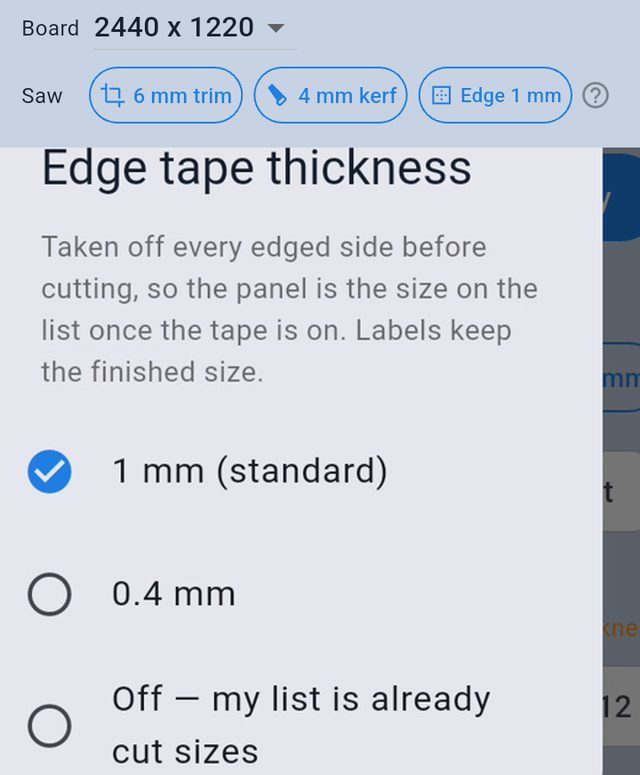
- Edge-tape thickness is taken off taped sides, so pieces finish exact.
What the yard gains
- Faster counter. A long list over several pages is read in about 20 seconds, instead of being typed part by part.
- Fewer re-cuts. Every size is checked against the handwriting, and parts bigger than the board, missing sizes and doubtful digits are flagged before the saw starts.
- Fewer disputes. The fundi sees the board count and the layout of every board before cutting, and the labels show which board every piece came from.
- Edging done right. Taped edges are on the list and on every label, and the tape thickness is taken off the cut size.
- Fundis come back. A yard that hands over a clean plan, labelled pieces and a printed quote looks professional.
How a yard starts
- Install NestCut on the counter phone and sign in with the yard's phone number (20 free scans to try it).
- Set your saw once: board sizes you stock, trim, kerf and edge tape.
- Load your board prices (or start from the typical list) and your cutting and edging rates.
- Scan the next fundi's list, check it with the fundi at the counter, then cut from the plan or send the MaxCut file to the office computer.
- Print our free cutting list forms for fundis to fill in: they scan best.
A plan both sides agree on
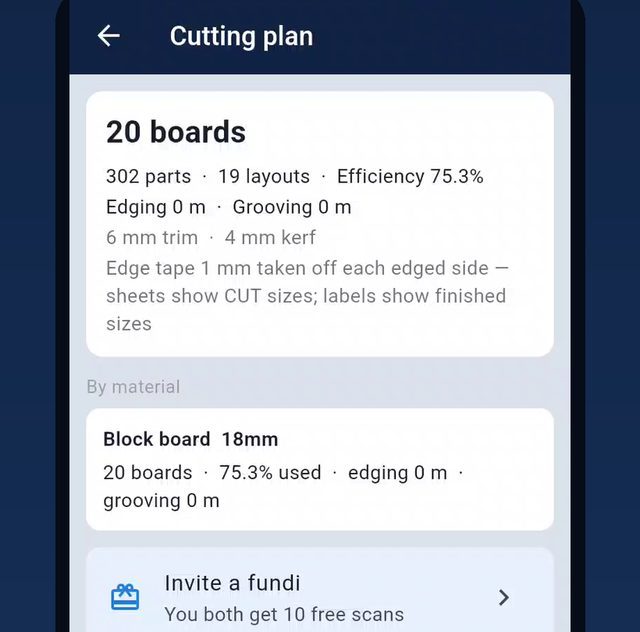
The plan shows the number of boards per material, the layout of every board and the edging metres, so the fundi and the yard agree on the job before cutting. Every board has its own cut list for the operator.
Labels on every piece
Print A4 label sheets (24 per sheet; start at any label on a half-used sheet). Each label carries the size, the board and panel number, and the edges to tape, so the edging bander and the fundi know exactly what each piece is.
Straight into MaxCut
If your yard optimises in MaxCut, NestCut exports a MaxCut import file (part name, length, width, quantity, material, edging per side, grooving) that you can share to the yard's computer on WhatsApp, email or Drive. No retyping. How the MaxCut export works →
Quotes for cutting jobs
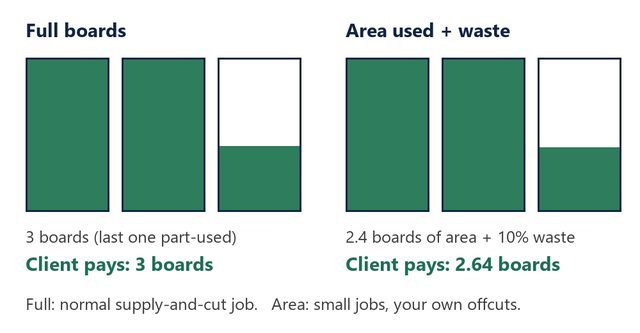
Quote supply-and-cut jobs by full boards, or charge only the area used + waste for small jobs, with cutting per board and edging per metre. Add your yard's name and M-Pesa details once.
On our roadmap for yards
Sending plans straight to beam saws and cutting software, DXF for CNC routers, and offcut tracking. Tell us which machines and software your yard uses, and we'll build for them first.
Frequently asked questions
Does NestCut replace MaxCut?
No need to replace anything. NestCut removes the typing: scan the list on a phone and send a MaxCut import file to the yard's computer. NestCut can also make its own optimised plan when there's no MaxCut.
Which board sizes does it support?
8×4 ft (2440 × 1220), 2400 × 1200, 10×4 ft (3050 × 1220), PG Bison 2750 × 1830 and any custom size.
Does it handle grain?
Yes, per material: with grain on, parts are never turned, so the first number (the length) always runs along the board's long side.
Can several staff use it?
Each person signs in on their own phone with their phone number or Google account. Talk to us about yard accounts.
Does it work offline?
Scanning and planning need an internet connection. Saved jobs are kept on your account.